
Are you spending money on marketing but guessing where your patients actually come from? If you ask a new patient how they found you, they usually just say, "Google." But did they click a paid ad, find you on Google Maps, or read your blog?
If you do not know the answer, you are flying blind. Google Analytics 4 for clinics is a powerful, event-based tracking tool. It shows exactly which marketing channels generate booked appointments. By setting up this tool correctly, you stop guessing your Return on Investment (ROI) and start scaling your practice.
Why Google Analytics 4 for Clinics Fails Without Custom Setup
Most chiropractors install the basic tracking code on their website and stop there. This is a massive mistake. Out of the box, GA4 only tracks "page views."
Page views do not pay the bills. Knowing that 500 people visited your homepage is useless if you do not know how many of them actually called your front desk. To properly use healthcare marketing analytics, you must customize the platform. You need to track specific patient actions, like clicking your phone number or submitting an intake form.
The HIPAA Warning: Keeping Your Healthcare Marketing Analytics Compliant
Before you track anything, you must protect your patients and your clinic. Google Analytics 4 is not HIPAA compliant straight out of the box. If you accidentally send Patient Identifiable Information (PII) to Google, you could face massive fines.

Critical PII Tracking Violations to Avoid
- Never track patient names.
- Never track email addresses or phone numbers.
- Never put medical conditions in your website URLs. (For example, do not use a URL like
yourclinic.com/thank-you?patient=john-smith&pain=sciatica).
You only want to track the anonymous action. You want GA4 to say, "One anonymous person clicked the phone number button today from a Google Search."
The 3 Crucial Conversions to Track in Google Analytics 4 for Clinics
To master tracking chiropractic marketing, you must set up GA4 to monitor the "Holy Trinity" of clinic conversions:
1. Tracking Phone Call Clicks
Over 60% of local medical searches happen on mobile phones. When a patient is in pain, they want to call you immediately. You must track every time a user taps the tel: (telephone) link on your website. This tells you exactly which marketing campaign made the phone ring.
2. Patient Intake Form Submissions
If a patient fills out your online appointment request form, that is a highly valuable lead. You should track every time a patient successfully lands on your "Thank You" page after submitting a form.
3. Tracking Chiropractic Marketing from Google Maps
Most local patients will find you in the Google Map Pack. However, GA4 lumps all Google traffic together as "Organic Search." You need to separate normal website clicks from Google Business Profile (GBP) clicks.
The Fix: Add a UTM tracking parameter to the website link inside your Google Business Profile.
| UTM Parameter | What You Should Type | Why It Matters |
|---|---|---|
| Website URL | https://yourclinic.com | Your actual homepage. |
| Source | ?utm_source=google | Tells GA4 the traffic came from Google. |
| Medium | &utm_medium=organic | Tells GA4 it was a free, organic click. |
| Campaign | &utm_campaign=gmb_listing | The Magic Key: Separates this click as coming specifically from Google Maps. |
Copy & Paste This Link Into Your Google Business Profile:
https://yourclinic.com/?utm_source=google&utm_medium=organic&utm_campaign=gmb_listingWhy You Need Google Tag Manager for Google Analytics 4
Setting up button-click tracking directly inside GA4 is very difficult for non-developers. To make GA4 conversion tracking for doctors easy, you must use Google Tag Manager (GTM).
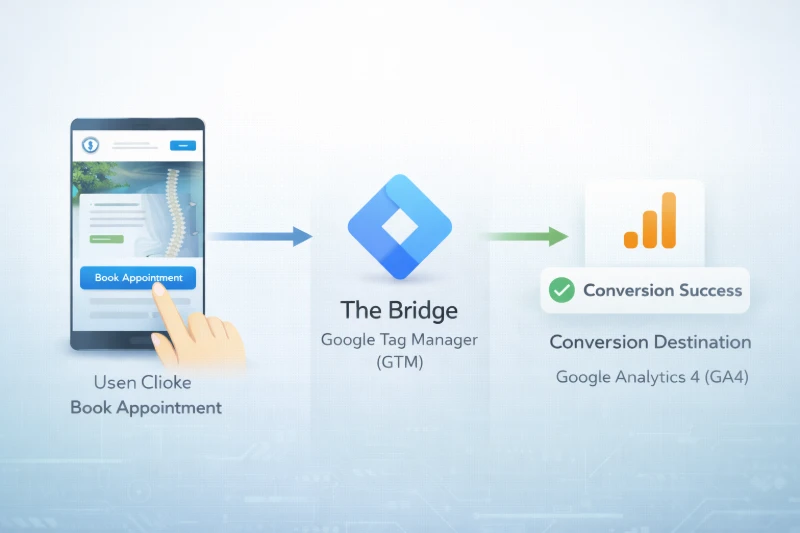
Think of GTM as the "bridge" between your website and GA4.
- The Website: The patient clicks the "Book Now" button.
- The Bridge (GTM): Google Tag Manager "catches" that click.
- The Destination (GA4): GTM securely sends a message to GA4 saying, "A booking conversion just happened."
Using GTM ensures your event-based tracking code stays clean and organized. It is much easier to manage without hiring an expensive web developer every time you change a button.
Frequently Asked Questions
Common questions about Google Analytics 4 for clinics.
Is Google Analytics 4 HIPAA compliant for doctors and chiropractors?
Out of the box, Google Analytics 4 is not HIPAA compliant. To make it compliant, you must sign a Business Associate Agreement (BAA) with Google (if using paid Google Workspace features). You must also ensure absolutely no Personally Identifiable Information (PII), such as names, emails, or medical data, is passed into your analytics events or URLs.
How do I track phone calls on my clinic website?
To track phone calls, you must use Google Tag Manager. Create a "Click - Just Links" trigger. Set the trigger to fire only when the Click URL contains "tel:". Then, send that specific event data over to Google Analytics 4 and mark it as a conversion.
How do I separate Google Maps traffic from regular organic traffic in GA4?
To separate Google Maps traffic, you must use custom UTM parameters. Add ?utm_source=google&utm_medium=organic&utm_campaign=gmb_listing to the end of the website link on your Google Business Profile. GA4 will then filter these patients into a specific campaign report.
Ready to Fill Your Waiting Room?
Stop losing patients to the clinic down the street. Let me show you exactly how to get your Ottawa chiropractic practice to the top of Google Maps.
Get Your Free Local Search Audit