
Imagine looking at your Google Analytics dashboard. You see 500 visitors came to your website this month. But when you check your schedule, you only have two new patient bookings. You are bleeding money, and you do not know why.
Traffic is useless if it does not convert. Fixing chiropractic website design mistakes is the fastest way to turn those lost visitors into booked appointments. In this guide, we explore the exact UI/UX (User Interface and User Experience) flaws that make patients leave your site. We also show you exactly how to fix them.
The Conversion Rate Math (Why UX Matters)
- Bad UX: 1,000 visitors at a 1% conversion rate = 10 new patients.
- Good UX: 1,000 visitors at a 5% conversion rate = 50 new patients.
- The Result: You get 5x the revenue without spending a single extra penny on marketing or ads.
Why Traditional Web Design Fails: The Root of Chiropractic Website Design Mistakes
Traditional web design fails chiropractors because it ignores "pain-driven UX." Patients visiting your site are often in acute physical pain. They cannot process a cluttered homepage with a high cognitive load.
When someone shops online for shoes, they want to browse. They want to look at 10 different pages and take their time. However, someone searching for a local chiropractor is different. They likely have severe sciatica, a pounding migraine, or a stiff neck from a car accident.
They are not browsing. They are seeking urgent medical relief. If your website architecture makes them think too hard or click too many times, they will leave. They will bounce back to Google and call the clinic down the street.
The 7 Chiropractic Website Design Mistakes Making Patients Bounce
Here are the seven most common chiropractic website design mistakes that destroy your clinic website conversion rate, along with the exact steps to fix them.
1. The "Hidden" Phone Number & Vague CTAs
When a patient is in pain, they want to talk to a human immediately. If they have to scroll to the very bottom of your website to find your phone number, you have already lost them.
- The Fix: Use a "sticky header" that stays at the top of the screen as the user scrolls. Put your phone number and a brightly colored "Book Appointment" Call-to-Action (CTA) button in the top right corner. Make sure the phone number is clickable on mobile devices.
2. Wasting the "Above the Fold" Real Estate
"Above the fold" is what a user sees on their screen before they start scrolling. This is the most valuable real estate on your website. Many clinics waste this space with giant logos, massive blocks of text, or confusing navigation menus.
- The Fix: Your above-the-fold section must have a clear headline. State exactly what you do and where you do it (e.g., "Relief from Back and Neck Pain in Ottawa"). Include a clear CTA directly below it.

Expert UX Warning: Stop Using Image Sliders!
Do not use rotating carousels or image sliders at the top of your homepage. Data shows they cause "banner blindness" (users ignore them). Even worse, they severely slow down your website's loading speed. This hurts your Core Web Vitals and Google rankings. Use one single, static, high-quality hero image instead.
3. Fake Stock Photos Destroying Trust
Google evaluates medical websites using E-E-A-T (Experience, Expertise, Authoritativeness, and Trustworthiness). Using generic stock photos of fake doctors or perfectly posed models destroys your clinical trust. Patients want to see the actual doctor who will be touching their spine.
- The Fix: Hire a local photographer to take real photos of your clinic's exterior, the waiting room, and your staff. Show yourself treating a patient. Real photos build instant credibility.
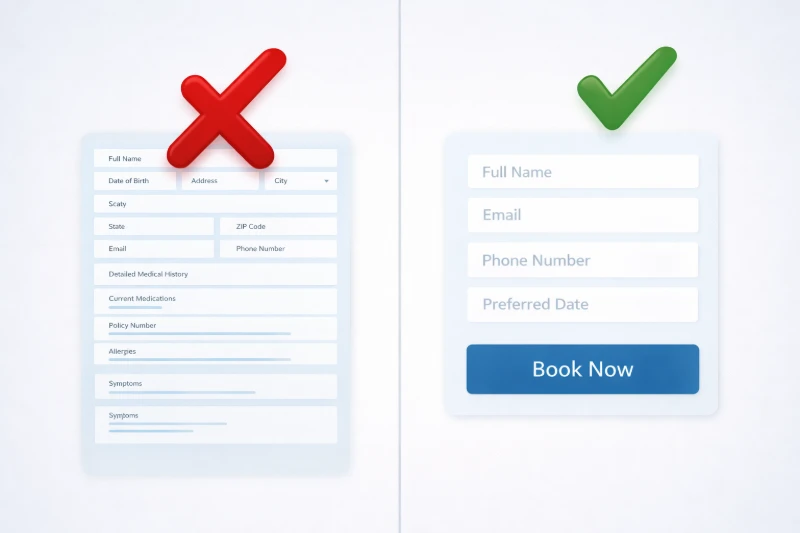
4. The 10-Page Patient Intake Form (Booking Friction)
One of the most fatal chiropractic website design mistakes is asking for too much information upfront. A patient might click "Book Appointment." If they are greeted by a massive form asking for their insurance ID, medical history, and social security number, they will abandon the page.
- The Fix: Practice micro-commitments. Your online patient intake forms should only ask for four things: Name, Email, Phone Number, and Primary Symptom. Collect the heavy medical paperwork when they arrive at the clinic in person.
5. Mobile-Unfriendly Layouts & Tiny Tap Targets
Over 60% of local medical searches happen on mobile phones. If your website is just a shrunken-down version of your desktop site, the text will be unreadable. The buttons will also be too small to tap.
- The Fix: Adopt a mobile-first indexing approach. Ensure your text is large enough to read without zooming in. Create "fat-finger friendly" buttons. These are easy to tap for someone holding a phone with one hand.
6. Missing Local Social Proof
You might claim to be the best chiropractor in town. However, if you have zero proof on your website, patients will not believe you. Putting a separate "Testimonials" page hidden in your menu is a massive conversion killer.
- The Fix: Embed real Google Reviews directly onto your homepage. Place them right under your main headline. Local trust signals are the fastest way to lower a patient's anxiety and get them to click "Book Now."
7. Focusing on the Doctor Instead of the Patient
Many clinic websites say things like, "Dr. Smith has 20 years of experience and uses the latest diversified techniques." The harsh truth is that patients do not care about your techniques. They care about their pain.
- The Fix: Change your copy from "We/Us" to "You." Instead of saying, "We offer spinal decompression," say, "Get relief from your herniated disc today." Focus entirely on the patient's desired outcome.
How to Audit Your Chiropractor Landing Page Optimization
You do not need to be a developer to check if your site is suffering from these UI/UX flaws. Do this simple 3-step test today to improve your chiropractor landing page optimization:
| The 5-Second Test | Bad UX (Failing) | Good UX (Passing) |
|---|---|---|
| 1. The Squint Test | The screen looks like a messy wall of text. | The "Book Now" button is the most obvious thing on the screen. |
| 2. The Mobile Test | You have to pinch and zoom to read the text. | The phone number is large and clickable with your thumb. |
| 3. The Grandmother Test | A non-technical person cannot figure out how to book an exam. | A non-technical person can book an exam in under 3 clicks. |
Frequently Asked Questions
Common questions about clinic website conversion rates.
What is a good clinic website conversion rate?
A healthy clinic website conversion rate is between 2% and 5%. If your site is converting below 2%, you have severe UI/UX friction. Elite, highly optimized clinic websites can achieve conversion rates of 8% or higher.
Why is my clinic's bounce rate so high?
A high bounce rate means visitors are leaving without clicking anything. This is usually caused by slow mobile loading speeds, confusing navigation, or a lack of clear contact information. Using vague, low-intent wellness content instead of symptom-specific solutions also drives patients away.
Where is the best place to put a 'Book Appointment' button?
The best place for a 'Book Appointment' CTA is in the top right corner of a sticky navigation menu. It should also be placed immediately above the fold in the center of the screen. Finally, repeat it at the bottom of every service page after the educational content.
Ready to Fill Your Waiting Room?
Stop losing patients to the clinic down the street. Let me show you exactly how to get your Ottawa chiropractic practice to the top of Google Maps.
Get Your Free Local Search Audit